Installing an APK update without checking its version can lead to unnecessary errors, outdated software, or uncertainty about whether the file is genuine. For Android users accessing Fairplay24, checking the APK version before installation is a useful security habit, especially when an app is downloaded directly rather than updated automatically through Google Play. Fairplay24 currently advises Android users to obtain APK files only from its official website or a verified support channel.
What Is an APK Version Number?
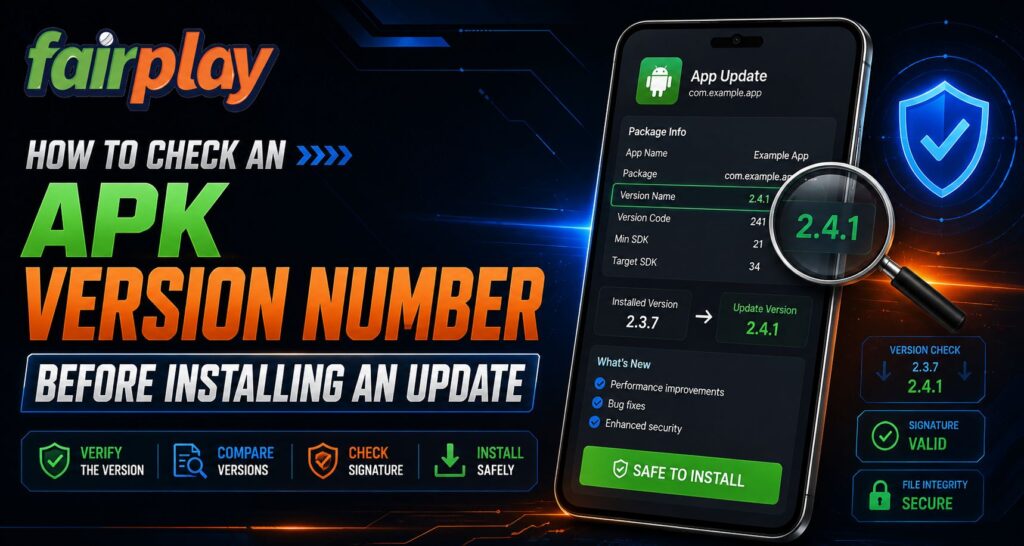
Android apps normally contain two important version values: versionName and versionCode.
According to Android’s official documentation:
- versionName is the user-facing version, such as 2.5.1.
- versionCode is an internal positive integer Android uses to determine which release is newer.
- A higher versionCode normally identifies a newer build.
- Android uses the version code to help prevent unintended downgrades.
For users checking Fairplay24 App updates, the visible version name is useful for comparison, while the internal version code ultimately helps Android determine whether the package qualifies as an update.
Step 1: Check the Version You Already Have
Before downloading anything, identify the version currently installed on your phone.
Depending on the Android manufacturer, app information can normally be accessed through the device’s Settings or by opening the app information screen. Menu names may vary between devices.
Users searching for Fairplay24 in Login instructions should avoid uninstalling the existing application simply because an update message appears. First determine whether the downloaded file is actually newer.
Write down the installed version if your phone displays it.
Step 2: Check the Version Listed on the Official Download Source
Next, compare the installed version with the version advertised by the authorised download page.
If, for example:
- Installed version: 3.2.0
- Available version: 3.3.0
the listed file appears to represent a newer release.
However, a visible version number alone does not prove that an APK is authentic. Users accessing Fairplay24 Com should also confirm that the file came from the recognised source rather than a forwarded message, social-media profile, advertisement, or unknown APK website.
Fairplay24’s current instructions specifically recommend downloading Android APK files through its official website or verified support route.
Step 3: Do Not Trust the APK Filename Alone
An APK filename might look like:
app-v4.1.2.apk
That can be helpful as a label, but filenames can easily be renamed. The number written in the filename is not the authoritative Android version information.
Android stores important app information in the application package itself, including its version details and application identity.
For Fairplay24 App users, treat a filename as a clue, not proof that the file is the latest or correct update.
Step 4: Understand What Android Checks During an Update
Android performs more than a simple version-name comparison.
Official Android documentation says a normal update must use the same application ID as the installed app. The signing certificate must also match the installed application, or use an authorised certificate-rotation process, while the update’s version code must meet Android’s update requirements.
Android also requires APKs to be digitally signed before they can be installed or used as application updates.
These checks help explain why a suspicious APK may fail to install even if its filename claims to be a newer release.
Step 5: Keep Google Play Protect Enabled
APK files installed outside Google Play deserve additional attention.
Google says Play Protect checks applications during installation and periodically scans installed apps. It may warn users, block installation, disable an application, or remove software identified as potentially harmful. Google recommends keeping Play Protect enabled.
Before a Fairplay24 Com APK update:
- Keep Play Protect switched on.
- Do not ignore a security warning automatically.
- Avoid files received through unknown chats.
- Verify the website before downloading.
- Do not disable Android security features simply to force an installation.
Step 6: Watch for Downgrade Warnings
A file described as an “update” might actually contain an older build.
Android’s versioning system uses versionCode to determine release order, and higher version codes represent newer versions. Android normally prevents installation of an APK with a lower version code over a newer installed version.
Users looking for Fairplay24 in Login help should therefore investigate if an update unexpectedly asks them to uninstall the current application first. Removing an existing app can also affect local data, depending on how that app stores information.
Quick APK Update Checklist
Before installing an APK update, check:
- Current installed version
- Version advertised by the official source
- Correct website or support channel
- App name and expected identity
- Android security warnings
- Play Protect status
- Whether the update unexpectedly requests an uninstall
- Any unusual new permissions
A version number is useful, but source verification and Android’s signing protections are equally important.
Conclusion
Checking an APK version before installation is a simple way to reduce confusion around Android updates. Fairplay users should compare the existing version with the authorised release information, avoid relying on filenames, and pay attention to Android security warnings.
Android uses version codes, application IDs, and signing certificates to distinguish legitimate updates from unrelated packages. For Fairplay24 App users, combining those protections with Play Protect and a verified download source provides a safer approach than installing every update link that appears.
FAQs
What is the difference between versionName and versionCode?
versionName is the version displayed to users, while versionCode is an internal number Android uses to compare releases.
Can I trust the version written in an APK filename?
No. A filename can be renamed and should not be treated as proof of the APK’s actual internal version.
Can Android stop an older APK from replacing a newer version?
Yes. Android uses the internal version code to help prevent downgrades.
Should I disable Play Protect to install an APK?
Google recommends keeping Play Protect enabled because it checks apps for potentially harmful behaviour.
Where should an APK update be downloaded from?
Use the application developer’s recognised distribution source. Fairplay24 currently advises users to obtain its APK through the official website or verified support channel.